The point of sale you buy once.
Register, books, inventory, payroll and table service for restaurants and small shops. It runs on the computer you already own, keeps working when the internet doesn't, and costs one hundred dollars. Not per month. Ever.
One payment for the full suite. Every update included, forever.
No subscription, no per-terminal fees, no contracts to cancel.
Computers per license: front counter, office and a spare.
Connected apps, from the register to the payroll calculator.
One sale at the register.
Everything else updates itself.
Ring up an order and press Record Data. Your Daily Book, inventory counts and profit reports fill in on their own, so there's nothing to reconcile at closing.
Software that answers
to you, not a server.
Offline by design
Everything runs on your machine. If the Wi-Fi drops in the middle of a dinner rush, the register keeps working.
Your data stays yours
Sales, customers and costs never leave your computer. We don't collect, store or see any of your business data.
Runs on what you have
Any Mac or Windows computer with 8 GB of RAM. It works with the receipt printers and touchscreens your operating system already supports.
See it run a service.
A walkthrough of the full suite, from building a menu to reading your bottom line.
What is your POS actually costing you?
Subscription POS systems often charge hundreds of dollars a month before you count the hardware. Enter what you pay now to see what it adds up to.
Estimate only. Stripe card processing fees still apply if you take cards in the app.
Learn every app
in an afternoon.
Short videos for each part of the suite. Start with Menu Setup. Once your menu is built, the rest fills in on its own.
Open for business
by tonight.
Download and install
Pick the Mac or Windows version. Your computer's security settings may ask questions. Choose "download anyway" or "more info" until it installs.
Build your menu
Add categories and items by hand, or turn a photo of your menu into a ready-to-load file with any AI assistant (see below).
Start ringing
Activate with your license key the first time you open the app. Add your Stripe API keys to take cards right away.
Specifications
- Bkeeper5000 and Tables install on any macOS or Windows machine
- 8 GB of RAM minimum
- Install on up to 3 machines per license
- Credit cards by manual entry through Stripe only
Quick tips
- Ctrl +/− (⌘ on Mac) resizes elements on every page
- Default general password for theme buttons: g
- Default admin password for everything else: a
- Check sales from your phone with Chrome Remote Desktop (free)
Security best practices
- Keep your POS device in a secure location
- Use device login passwords
- Don't leave the terminal unattended while logged in
- Back up your data regularly
Point of Sale
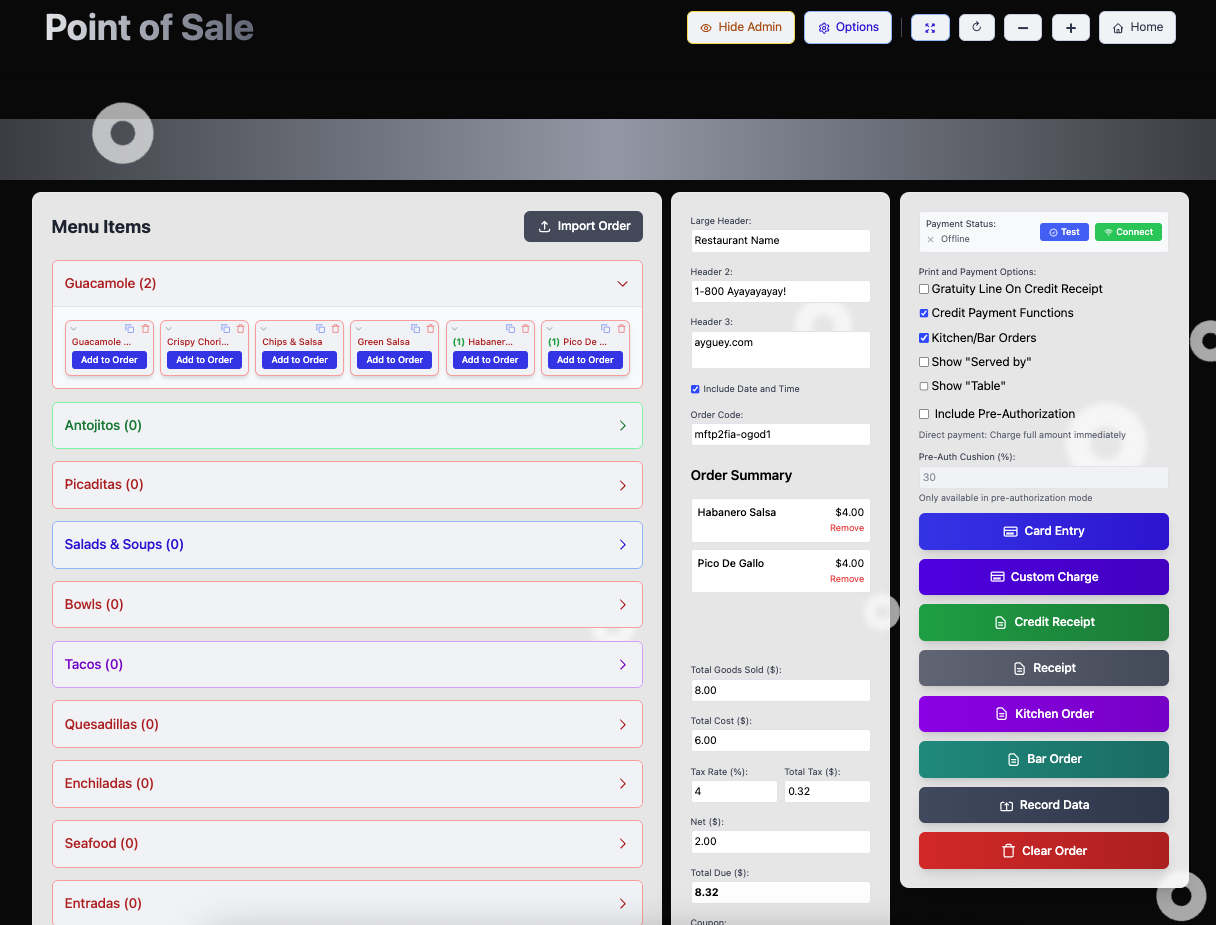
The main page for managers and employees. Print receipts and kitchen or bar tickets, record orders, process cards, edit the menu and customize receipts. All of your data starts here.
Tables
The page for servers. Print receipts and tickets, split checks and add automatic gratuity. It needs no password because it has no access to sensitive data.
Data management
Record Data writes sales and inventory to your records automatically. Filter results in the Book and Inventory apps in real time, void orders with one click and print full reports.
Menus
Save unlimited menus as ordinary files on your computer. Use Save for Tables to share a menu between the register and the Tables app.
Networking
Machines running Bkeeper5000 don't talk to each other. They're fully offline. Any file can be copied between systems by hand, whether across the room or across the world.
Set up your whole menu with AI in minutes.
- Copy the prompt
- Paste it into any AI assistant (Claude, ChatGPT, etc.)
- Attach a photo or screenshot of your menu with prices
- Save the two JSON files it returns
- Load them into your Point of Sale and Tables apps
Restaurant Menu JSON Conversion Prompt
"I need you to convert the attached restaurant menu into two specific JSON files that match these exact schemas. Please analyze the menu content and create:
File 1: Tables Menu (Tables-Menu_[RestaurantName]_[DATE].json)
Create a JSON file with this exact structure:
json{
  "menuItems": [
    {
      "name": "string - exact item name",
      "price": number,
      "category": "string - category name",
      "addOns": [
        {
          "name": "string - addon name",
          "price": number
        }
      ],
      "hasAddOns": boolean
    }
  ],
  "header1": "Restaurant Name",
  "header2": "",
  "header3": "",
  "footer1": "",
  "footer2": "Thank you message",
  "timestamp": "ISO 8601 datetime",
  "supportsAddOns": true,
  "version": "2.0",
  "customCategories": [
    {
      "name": "string - category name",
      "routeTo": "kitchen, bar, or other",
      "colorIndex": number,
      "id": "cat-loaded-[number]-[timestamp]"
    }
  ]
}
File 2: Point of Sale Menu (Full_Menu_[RestaurantName]Point_of_Sale[DATE].json)
Create a JSON file with this exact structure where the items array contains either null or item objects:
json{
  "calculations": {
    "items": [
      null or {
        "name": "string - item name",
        "price": number,
        "cost": number,
        "quantity": 0,
        "instructions": "",
        "profit": number (price - cost),
        "margin": number ((profit/price)*100),
        "category": "string - category name",
        "routeTo": "kitchen, bar, or other",
        "addOns": [
          {
            "name": "string",
            "price": number,
            "cost": number,
            "checked": false
          }
        ]
      }
    ],
    "taxRate": 0,
    "gratuity": 0,
    "gratuityAmount": 0,
    "greeting": "Thank you message",
    "includeDateTime": true,
    "couponType": "percentage",
    "largeHeader": "Restaurant Name",
    "header2": "Phone Number",
    "header3": "Website",
    "customCategories": [
      {
        "name": "string - category name",
        "routeTo": "kitchen, bar, or other",
        "colorIndex": number (0-11)
      }
    ]
  }
}
Important Rules:

For the Point of Sale items array: Create an array with many null values and place actual item objects at various positions (this appears to be for POS button layout)
Routing:

Food items, desserts, appetizers → "kitchen"
All beverages (alcoholic and non-alcoholic) → "bar"
Retail items, merchandise, packaged goods → "other"


Cost Calculations (for Point of Sale only):

Set all cost values to 0 (zero). Users will input their actual costs manually.

profit = price - cost
margin = (profit / price) * 100


Add-ons:

Items with add-ons: hasAddOns = true
Items without: hasAddOns = false, addOns = []


Categories: Both files must have matching category names in customCategories array
Special Characters: Preserve all accents and special characters exactly as shown
All items in Tables Menu should have corresponding entries somewhere in the Point of Sale items array (among the nulls)

Please ensure both files are valid JSON and follow this exact structure.
Two prices. Both one-time.
Every license covers up to three computers, and every future update is included.

Bkeeper5000
The complete POS and management suite
- Point of sale
- Daily Book records
- Inventory management
- Tabs & gift cards
- Payroll calculator
- Operations calculator
- Menu item pricing tool
- Custom receipts & tickets
- Stripe card payments
- Real-time reports & charts

Tables
Order management for servers
- Interactive menus by table and seat
- Split checks & even splits
- Auto-gratuity
- Kitchen & bar tickets
- Loads menus from your POS
Not ready yet? Download either app and try it before you buy. Activating after the trial requires a license key.
Questions, answered.
Still stuck? Email support@bkeeper5000.com and we'll make it a top priority.
How is the price so low?
Bkeeper5000 is built to be the alternative to the subscription model. Much of what the big POS companies charge for is ongoing service and support. We're a very small team, so we don't offer on-site or live support. Instead, we keep the FAQ and tutorials up to date. If they don't answer your question, email us and we'll make it a top priority. Bkeeper5000 is also Version 1.0 software: a fully functional early release that we're actively improving based on user feedback.
Do I need to buy expensive equipment?
No. Bkeeper5000 runs on your existing macOS or Windows computer, and we don't make any hardware. It works with any printer or touchscreen your operating system supports. Printers we know work well include the Star microprint, Rongta 80 and EOM-POS. You'll need at least 8 GB of RAM.
Are there really no monthly fees?
Correct, there are never any subscription fees. Bkeeper5000 is $100 once and Tables is $10 once. Traditional restaurant POS systems charge hundreds of dollars a month, so you could save thousands every year.
Can I install on multiple computers?
Yes. Each license allows installation on up to 3 machines, macOS or Windows.
Which payment processors do you support?
Right now the only supported card method is manual card entry through Stripe. You'll need a Stripe account to take payments directly in the app.
Can I check my sales in real time on my phone?
Yes. The app runs on a normal Windows or macOS computer, so you can use any reliable remote-access app to reach it from your phone. We recommend Chrome Remote Desktop, which is free. Install it on your phone and your computer, and you can check in on your business from anywhere with your Google login.
How do I purchase the app?
Choose a plan in the Pricing section and you'll go to our Gumroad licensing page. There you buy a key, which you enter the first time you open the app. Make sure you download the right version (Windows or Mac). Your computer's security settings will probably ask questions during install. Click "download anyway", "more info" or "other options" until it installs.